- The Innovation AI
- Posts
- AI to support UK finance operations
AI to support UK finance operations
Plus: Meta CEO Mark Zuckerberg building AI agent to help do his job: Report

Hafizur Rahman
March 23, 2026
In partnership with


Today's Newsletter Highlights:
AI to support UK finance operations
Meta CEO Mark Zuckerberg building AI agent to help do his job: Report
How to Create Canva Designs Instantly Using ChatGPT
Best AI Tools
🎇 AI NEWS TODAY 🎇
Turn AI Into Extra Income

You don’t need to be a coder to make AI work for you. Subscribe to Mindstream and get 200+ proven ideas showing how real people are using ChatGPT, Midjourney, and other tools to earn on the side.
From small wins to full-on ventures, this guide helps you turn AI skills into real results, without the overwhelm.
AI to support UK finance operations

Palantir AI Enters UK Financial System
U.S. company Palantir Technologies is entering the UK’s financial sector. This move goes beyond its focus on defence and healthcare.
They’ve secured a deal with the UK regulator, the Financial Conduct Authority (FCA).
The Goal: Use AI to analyse large financial datasets and improve oversight.
💼 What the AI Will Actually Do
Palantir’s AI platform will assist the FCA to:
Detect fraud and money laundering
Identify high-risk financial entities
Analyse complex datasets (emails, transactions, reports, etc.)
Prioritise investigations more efficiently
In short, it acts like a supercharged intelligence layer for detecting financial crime.
⚙️ How It Works (Simplified)
Palantir’s systems, like Foundry and AIP:
Integrate data from various sources into one “data lake”
Use AI models to uncover hidden patterns
Surface insights that regulators might miss manually
This enables quicker and more proactive enforcement.
⚠️ Why It’s Controversial
This deal has sparked attention and criticism:
🔐 Privacy Concerns The FCA’s data includes sensitive financial and personal information. Critics worry about how securely and ethically this data is managed.
🧠 AI Reliability Risks Experts warn that criminals could exploit AI systems with misleading data inputs.
🏛️ Palantir’s Reputation The company already works with military systems and police surveillance.
88% resolved. 22% loyal. Your stack has a problem.

Those numbers aren't a CX issue — they're a design issue. Gladly's 2026 Customer Expectations Report breaks down exactly where AI-powered service loses customers, and what the architecture of loyalty-driven CX actually looks like.
Meta CEO Mark Zuckerberg building AI agent to help do his job: Report

Mark Zuckerberg is working on a personal AI agent to help run Meta Platforms. Think of it as an AI “assistant CEO.”
⚙️ What this AI agent does
Provides instant information (no more asking teams)
Acts like a supercharged chief of staff
Aids in decision-making and workflow management
Cuts through corporate layers and red tape
In short, it's a real-time brain. It fetches, analyses, and summarises everything needed to manage the company.
🚀 Why Zuckerberg is doing this
This isn’t just a personal project—it’s part of a larger shift:
Meta aims to be an AI-first company
Focus on faster execution with fewer employees
Compete with lean AI-native startups
Encourage staff to use and create their own AI tools
A key belief is emerging:
👉 Even CEO-level tasks can be enhanced (or replaced) by AI.
🏢 What’s changing inside Meta
Flatter organisational structure with fewer managers
Internal AI tools like “Second Brain” for productivity
Heavy investment in AI labs and agent systems
⚠️ Not all smooth (important context)
AI agents at Meta are still in the experimental stage:
There have been internal mistakes and security issues
Employees are excited but also anxious about job security
How to Create Canva Designs Instantly Using ChatGPT
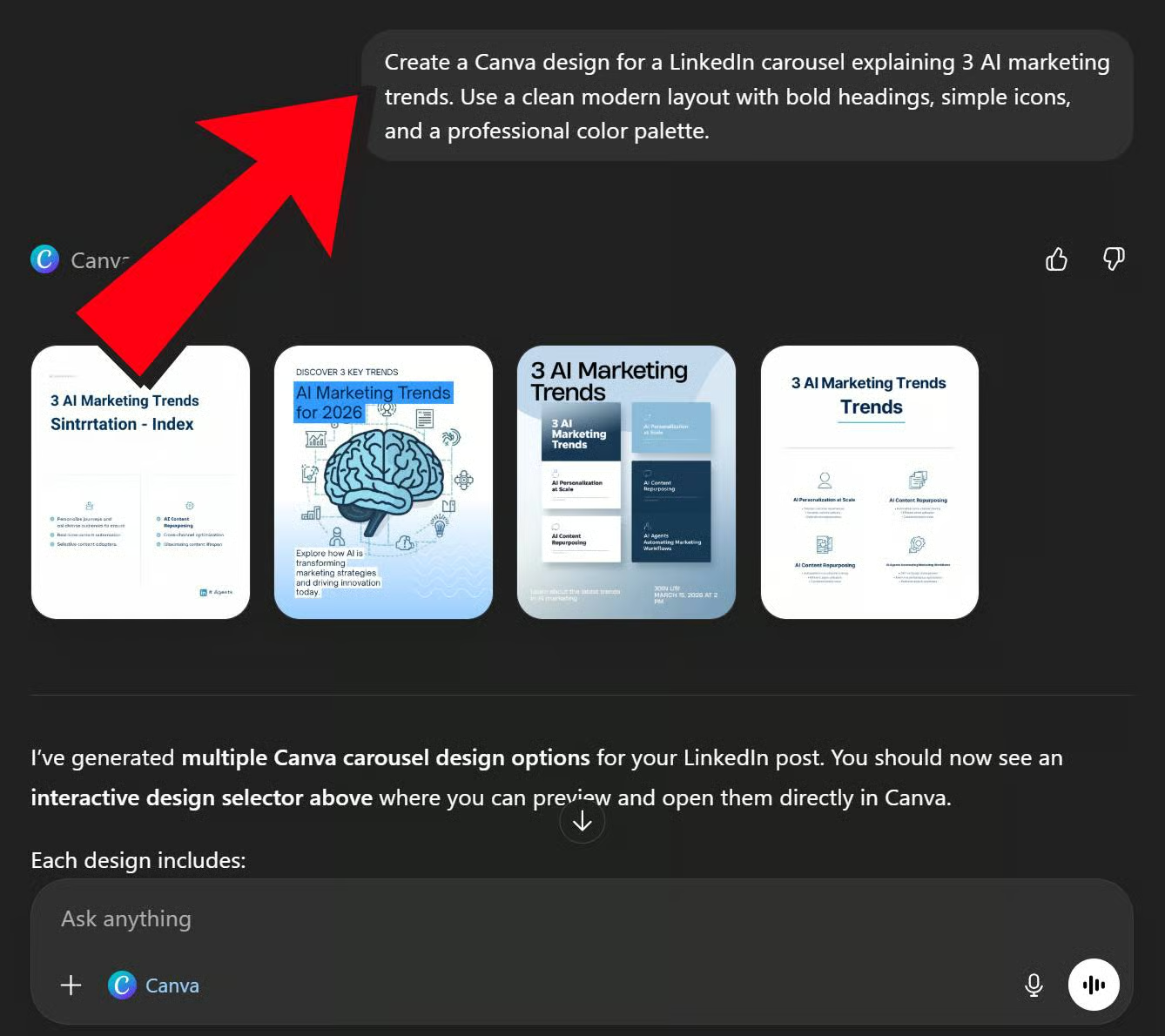
Connect ChatGPT to Canva and generate ready-to-edit designs directly from a prompt.
Here's how to do it (step-by-step):
Step 1: Open ChatGPT (Plus/Pro/Team/Enterprise)
Step 2: Go to Profile → Settings → Apps and connect your Canva account.
Step 3: In a chat, click the "+" icon → More → Canva.
Step 4: Paste this prompt
“Create a Canva design for a LinkedIn carousel explaining 3 AI marketing trends. Use a clean modern layout with bold headings, simple icons, and a professional color palette.”
Step 5: ChatGPT will generate a Canva design preview you can open and edit directly in Canva.
Quick Tip:If you have Memory enabled, Canva reads it, so prompting "design a flyer for my business" will automatically apply your business name, niche, and context without you typing it every time.
🎇 TOP NEW AI TOOLS 🎇
Free AI Tools You Shouldn’t Miss
🎇 Proximity Lock System 2.0 - Never worry about leaving your computer unlocked again!
🎇 Juno digital planner - All your tasks and events in one calm, offline-first planner!
🎇 Artifacts - Collect, share and celebrate what endures through objects!
🎇 Unlimited Prompts - Get 10k+ ChatGPT prompts now! (Get 70% OFF)
🎇 Planndu - AI todo list, task manager, planner & reminder app, tasks!
Move us from the 'Promotions' to your 'Primary Inbox' and get AI news, tips, and tutorials delivered straight to you. Don't miss your chance to stay on top of the AI industry's latest buzz!